
Deploy a GKE Cluster with Portworx

Let's deploy a nice GKE Cluster with a customized Portworx deployment using security capabilities and encrypted volumes

Get your own GCP account, download gcloud and authenticate on your laptop.

gcloud container clusters create carlos-lab01 \
    --zone us-east1-b \
    --disk-type=pd-ssd \
    --disk-size=50GB \
    --labels=portworx=gke \
    --machine-type=n1-highcpu-8 \
    --num-nodes=5 \
    --image-type ubuntu \
    --scopes compute-rw,storage-ro,cloud-platform \
    --enable-autoscaling --max-nodes=5 --min-nodes=5
    

gcloud container clusters get-credentials carlos-lab01 --zone us-east1-b --project <your-project>

gcloud services enable compute.googleapis.com

Wail until having your cluster available
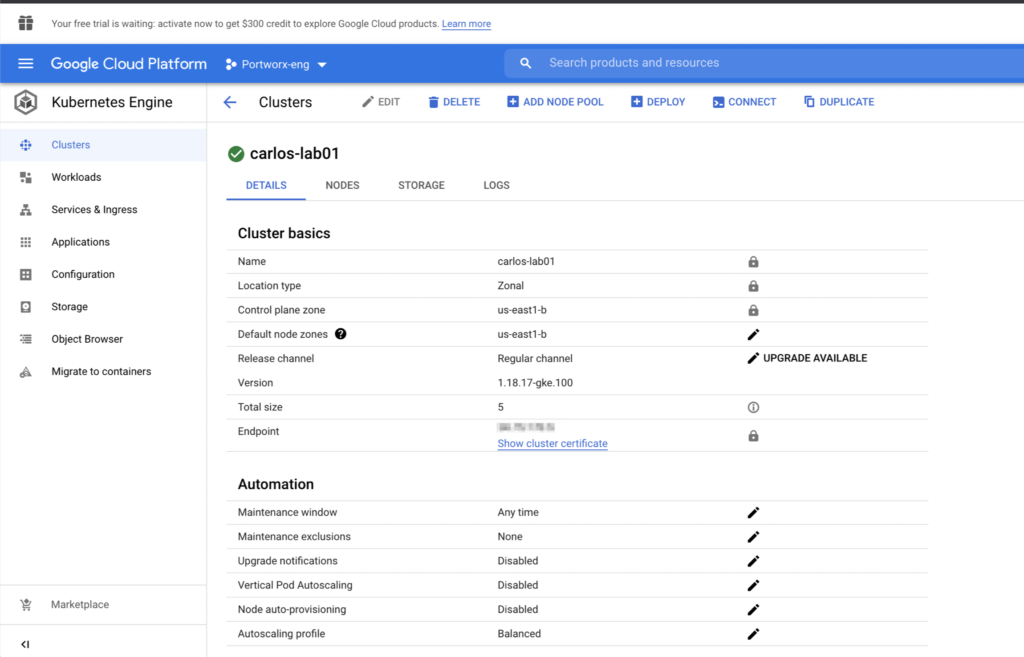
Then you can install Portworx using the operator.

operator.yaml

# SOURCE: https://install.portworx.com/?comp=pxoperator
apiVersion: v1
kind: ServiceAccount
metadata:
  name: portworx-operator
  namespace: kube-system
---
kind: ClusterRole
apiVersion: rbac.authorization.k8s.io/v1
metadata:
   name: portworx-operator
rules:
  - apiGroups: ["*"]
    resources: ["*"]
    verbs: ["*"]
---
kind: ClusterRoleBinding
apiVersion: rbac.authorization.k8s.io/v1
metadata:
  name: portworx-operator
subjects:
- kind: ServiceAccount
  name: portworx-operator
  namespace: kube-system
roleRef:
  kind: ClusterRole
  name: portworx-operator
  apiGroup: rbac.authorization.k8s.io
---
apiVersion: apps/v1
kind: Deployment
metadata:
  name: portworx-operator
  namespace: kube-system
spec:
  strategy:
    rollingUpdate:
      maxSurge: 1
      maxUnavailable: 1
    type: RollingUpdate
  replicas: 1
  selector:
    matchLabels:
      name: portworx-operator
  template:
    metadata:
      labels:
        name: portworx-operator
    spec:
      containers:
      - name: portworx-operator
        imagePullPolicy: Always
        image: portworx/px-operator:1.5.0
        command:
        - /operator
        - --verbose
        - --driver=portworx
        - --leader-elect=true
        env:
        - name: OPERATOR_NAME
          value: portworx-operator
        - name: POD_NAME
          valueFrom:
            fieldRef:
              fieldPath: metadata.name
      affinity:
        podAntiAffinity:
          requiredDuringSchedulingIgnoredDuringExecution:
            - labelSelector:
                matchExpressions:
                  - key: "name"
                    operator: In
                    values:
                    - portworx-operator
              topologyKey: "kubernetes.io/hostname"
      serviceAccountName: portworx-operator

px-enterprisecluster.yaml

# SOURCE: https://install.portworx.com/?operator=true&mc=false&kbver=1.20.8&b=true&kd=type%3Dpd-standard%2Csize%3D150&csicd=true&mz=5&s=%22type%3Dpd-ssd%2Csize%3D150%22&j=auto&c=px-cluster-cb94f533-5006-4299-b6b4-ad8e09690b74&gke=true&stork=true&csi=true&mon=true&st=k8s&promop=true
kind: StorageCluster
apiVersion: core.libopenstorage.org/v1
metadata:
  name: px-cluster-cb94f533-5006-4299-b6b4-ad8e09690b74
  namespace: kube-system
  annotations:
    portworx.io/install-source: "https://install.portworx.com/?operator=true&mc=false&kbver=1.20.8&b=true&kd=type%3Dpd-standard%2Csize%3D150&csicd=true&mz=5&s=%22type%3Dpd-ssd%2Csize%3D150%22&j=auto&c=px-cluster-cb94f533-5006-4299-b6b4-ad8e09690b74&gke=true&stork=true&csi=true&mon=true&st=k8s&promop=true"
    portworx.io/is-gke: "true"
spec:
  image: portworx/oci-monitor:2.8.0
  imagePullPolicy: Always
  kvdb:
    internal: true
  cloudStorage:
    deviceSpecs:
    - type=pd-ssd,size=200
    journalDeviceSpec: auto
    kvdbDeviceSpec: type=pd-standard,size=50
    maxStorageNodesPerZone: 5
  secretsProvider: k8s
  stork:
    enabled: true
    args:
      webhook-controller: "false"
  autopilot:
    enabled: true
    providers:
    - name: default
      type: prometheus
      params:
        url: http://prometheus:9090
  monitoring:
    telemetry:
      enabled: true
    prometheus:
      enabled: true
      exportMetrics: true
  featureGates:
    CSI: "true"
kubectl create clusterrolebinding myname-cluster-admin-binding \
    --clusterrole=cluster-admin --user=`gcloud info --format='value(config.account)'`

kubectl apply -f operator.yaml

kubectl apply -f px-enterprisecluster.yaml
kubectl get all -n kube-system                                                                                                
NAME                                                           READY   STATUS    RESTARTS   AGE
pod/autopilot-7b4f7f58f4-kchs4                                 1/1     Running   0          34m
pod/event-exporter-gke-67986489c8-prn9p                        2/2     Running   0          41m
pod/fluentbit-gke-bn5nm                                        2/2     Running   0          41m
pod/fluentbit-gke-f7k2j                                        2/2     Running   0          41m
pod/fluentbit-gke-h672g                                        2/2     Running   0          41m
pod/fluentbit-gke-n9664                                        2/2     Running   0          41m
pod/fluentbit-gke-xjttt                                        2/2     Running   0          41m
pod/gke-metrics-agent-d64hw                                    1/1     Running   0          41m
pod/gke-metrics-agent-fhw8l                                    1/1     Running   0          41m
pod/gke-metrics-agent-gsfvk                                    1/1     Running   0          41m
pod/gke-metrics-agent-mqm64                                    1/1     Running   0          41m
pod/gke-metrics-agent-wwjvx                                    1/1     Running   0          41m
pod/kube-dns-6c7b8dc9f9-q8v75                                  4/4     Running   0          41m
pod/kube-dns-6c7b8dc9f9-wqthz                                  4/4     Running   0          41m
pod/kube-dns-autoscaler-844c9d9448-4fx8f                       1/1     Running   0          41m
pod/kube-proxy-gke-carlos-lab01-default-pool-a6362dc8-11k6     1/1     Running   0          41m
pod/kube-proxy-gke-carlos-lab01-default-pool-a6362dc8-5lgd     1/1     Running   0          16m
pod/kube-proxy-gke-carlos-lab01-default-pool-a6362dc8-b73f     1/1     Running   0          41m
pod/kube-proxy-gke-carlos-lab01-default-pool-a6362dc8-n5fl     1/1     Running   0          41m
pod/kube-proxy-gke-carlos-lab01-default-pool-a6362dc8-v02w     1/1     Running   0          41m
pod/l7-default-backend-56cb9644f6-xfd65                        1/1     Running   0          41m
pod/metrics-server-v0.3.6-9c5bbf784-9z6sm                      2/2     Running   0          40m
pod/pdcsi-node-4wprs                                           2/2     Running   0          41m
pod/pdcsi-node-685ht                                           2/2     Running   0          41m
pod/pdcsi-node-g42tb                                           2/2     Running   0          41m
pod/pdcsi-node-ln4tw                                           2/2     Running   0          41m
pod/pdcsi-node-ncqhl                                           2/2     Running   0          41m
pod/portworx-api-76kcn                                         1/1     Running   0          34m
pod/portworx-api-887bl                                         1/1     Running   0          34m
pod/portworx-api-br4f2                                         1/1     Running   0          34m
pod/portworx-api-hzfsn                                         1/1     Running   0          34m
pod/portworx-api-zcd4m                                         1/1     Running   0          34m
pod/portworx-kvdb-8ls5k                                        1/1     Running   0          71s
pod/portworx-kvdb-c797z                                        1/1     Running   0          13m
pod/portworx-kvdb-gmxpv                                        1/1     Running   0          13m
pod/portworx-operator-bfc87df78-schcz                          1/1     Running   0          36m
pod/portworx-pvc-controller-696959f9bc-4kj5v                   1/1     Running   0          34m
pod/portworx-pvc-controller-696959f9bc-gn2tw                   1/1     Running   0          34m
pod/portworx-pvc-controller-696959f9bc-jmsxn                   1/1     Running   0          34m
pod/prometheus-px-prometheus-0                                 3/3     Running   1          33m
pod/px-cluster-cb94f533-5006-4299-b6b4-ad8e09690b74-9pvws      3/3     Running   0          74s
pod/px-cluster-cb94f533-5006-4299-b6b4-ad8e09690b74-hnzs8      3/3     Running   0          88s
pod/px-cluster-cb94f533-5006-4299-b6b4-ad8e09690b74-j7vrc      3/3     Running   1          34m
pod/px-cluster-cb94f533-5006-4299-b6b4-ad8e09690b74-sgm67      3/3     Running   0          113s
pod/px-cluster-cb94f533-5006-4299-b6b4-ad8e09690b74-xvzxn      3/3     Running   0          13m
pod/px-csi-ext-5686675c58-5qfzq                                3/3     Running   0          34m
pod/px-csi-ext-5686675c58-dbmmb                                3/3     Running   0          34m
pod/px-csi-ext-5686675c58-vss9p                                3/3     Running   0          34m
pod/px-prometheus-operator-8c88487bc-jv9fd                     1/1     Running   0          34m
pod/stackdriver-metadata-agent-cluster-level-9548fb7d6-vm552   2/2     Running   0          41m
pod/stork-75dd8b896-g4qqj                                      1/1     Running   0          34m
pod/stork-75dd8b896-mb2xt                                      1/1     Running   0          34m
pod/stork-75dd8b896-zjlwm                                      1/1     Running   0          34m
pod/stork-scheduler-574757dd8d-866bv                           1/1     Running   0          34m
pod/stork-scheduler-574757dd8d-jhx7w                           1/1     Running   0          34m
pod/stork-scheduler-574757dd8d-mhg99                           1/1     Running   0          34m

NAME                                TYPE        CLUSTER-IP     EXTERNAL-IP   PORT(S)                               AGE
service/default-http-backend        NodePort    10.3.241.138   <none>        80:31243/TCP                          41m
service/kube-dns                    ClusterIP   10.3.240.10    <none>        53/UDP,53/TCP                         41m
service/kubelet                     ClusterIP   None           <none>        10250/TCP                             33m
service/metrics-server              ClusterIP   10.3.248.53    <none>        443/TCP                               41m
service/portworx-api                ClusterIP   10.3.242.28    <none>        9001/TCP,9020/TCP,9021/TCP            34m
service/portworx-operator-metrics   ClusterIP   10.3.247.121   <none>        8999/TCP                              35m
service/portworx-service            ClusterIP   10.3.245.123   <none>        9001/TCP,9019/TCP,9020/TCP,9021/TCP   34m
service/prometheus-operated         ClusterIP   None           <none>        9090/TCP                              33m
service/px-csi-service              ClusterIP   None           <none>        <none>                                34m
service/px-prometheus               ClusterIP   10.3.245.244   <none>        9090/TCP                              34m
service/stork-service               ClusterIP   10.3.242.128   <none>        8099/TCP,443/TCP                      34m

NAME                                       DESIRED   CURRENT   READY   UP-TO-DATE   AVAILABLE   NODE SELECTOR                                                        AGE
daemonset.apps/fluentbit-gke               5         5         5       5            5           kubernetes.io/os=linux                                               41m
daemonset.apps/gke-metrics-agent           5         5         5       5            5           kubernetes.io/os=linux                                               41m
daemonset.apps/gke-metrics-agent-windows   0         0         0       0            0           kubernetes.io/os=windows                                             41m
daemonset.apps/kube-proxy                  0         0         0       0            0           kubernetes.io/os=linux,node.kubernetes.io/kube-proxy-ds-ready=true   41m
daemonset.apps/metadata-proxy-v0.1         0         0         0       0            0           cloud.google.com/metadata-proxy-ready=true,kubernetes.io/os=linux    41m
daemonset.apps/nvidia-gpu-device-plugin    0         0         0       0            0           <none>                                                               41m
daemonset.apps/pdcsi-node                  5         5         5       5            5           kubernetes.io/os=linux                                               41m
daemonset.apps/pdcsi-node-windows          0         0         0       0            0           kubernetes.io/os=windows                                             41m
daemonset.apps/portworx-api                5         5         5       5            5           <none>                                                               34m

NAME                                                       READY   UP-TO-DATE   AVAILABLE   AGE
deployment.apps/autopilot                                  1/1     1            1           34m
deployment.apps/event-exporter-gke                         1/1     1            1           41m
deployment.apps/kube-dns                                   2/2     2            2           41m
deployment.apps/kube-dns-autoscaler                        1/1     1            1           41m
deployment.apps/l7-default-backend                         1/1     1            1           41m
deployment.apps/metrics-server-v0.3.6                      1/1     1            1           41m
deployment.apps/portworx-operator                          1/1     1            1           36m
deployment.apps/portworx-pvc-controller                    3/3     3            3           34m
deployment.apps/px-csi-ext                                 3/3     3            3           34m
deployment.apps/px-prometheus-operator                     1/1     1            1           34m
deployment.apps/stackdriver-metadata-agent-cluster-level   1/1     1            1           41m
deployment.apps/stork                                      3/3     3            3           34m
deployment.apps/stork-scheduler                            3/3     3            3           34m

NAME                                                                  DESIRED   CURRENT   READY   AGE
replicaset.apps/autopilot-7b4f7f58f4                                  1         1         1       34m
replicaset.apps/event-exporter-gke-67986489c8                         1         1         1       41m
replicaset.apps/kube-dns-6c7b8dc9f9                                   2         2         2       41m
replicaset.apps/kube-dns-autoscaler-844c9d9448                        1         1         1       41m
replicaset.apps/l7-default-backend-56cb9644f6                         1         1         1       41m
replicaset.apps/metrics-server-v0.3.6-57bc866888                      0         0         0       41m
replicaset.apps/metrics-server-v0.3.6-886d66856                       0         0         0       41m
replicaset.apps/metrics-server-v0.3.6-9c5bbf784                       1         1         1       40m
replicaset.apps/portworx-operator-bfc87df78                           1         1         1       36m
replicaset.apps/portworx-pvc-controller-696959f9bc                    3         3         3       34m
replicaset.apps/px-csi-ext-5686675c58                                 3         3         3       34m
replicaset.apps/px-prometheus-operator-8c88487bc                      1         1         1       34m
replicaset.apps/stackdriver-metadata-agent-cluster-level-546484c84b   0         0         0       41m
replicaset.apps/stackdriver-metadata-agent-cluster-level-9548fb7d6    1         1         1       41m
replicaset.apps/stork-75dd8b896                                       3         3         3       34m
replicaset.apps/stork-scheduler-574757dd8d                            3         3         3       34m

NAME                                        READY   AGE
statefulset.apps/prometheus-px-prometheus   1/1     33m

You can try to test the features of Portworx deploying one Statefulset application

kubectl get sc
NAME                             PROVISIONER                     RECLAIMPOLICY   VOLUMEBINDINGMODE      ALLOWVOLUMEEXPANSION   AGE
premium-rwo                      pd.csi.storage.gke.io           Delete          WaitForFirstConsumer   true                   29h
px-db                            kubernetes.io/portworx-volume   Delete          Immediate              true                   29h
px-db-cloud-snapshot             kubernetes.io/portworx-volume   Delete          Immediate              true                   29h
px-db-cloud-snapshot-encrypted   kubernetes.io/portworx-volume   Delete          Immediate              true                   29h
px-db-encrypted                  kubernetes.io/portworx-volume   Delete          Immediate              true                   29h
px-db-local-snapshot             kubernetes.io/portworx-volume   Delete          Immediate              true                   29h
px-db-local-snapshot-encrypted   kubernetes.io/portworx-volume   Delete          Immediate              true                   29h
px-replicated                    kubernetes.io/portworx-volume   Delete          Immediate              true                   29h
px-replicated-encrypted          kubernetes.io/portworx-volume   Delete          Immediate              true                   29h
px-secure-sc                     kubernetes.io/portworx-volume   Delete          Immediate              false                  28h
standard (default)               kubernetes.io/gce-pd            Delete          Immediate              true                   29h
standard-rwo                     pd.csi.storage.gke.io           Delete          WaitForFirstConsumer   true                   29h
stork-snapshot-sc                stork-snapshot                  Delete          Immediate              true                   37m

Alright then, we need to create a Cluster Wide secret key to handle our encrypted StorageClasses

YOUR_SECRET_KEY=this-is-gonna-be-your-secret-key

kubectl -n kube-system create secret generic px-vol-encryption \
  --from-literal=cluster-wide-secret-key=$YOUR_SECRET_KEY

And apply this secret to Portworx

PX_POD=$(kubectl get pods -l name=portworx -n kube-system -o jsonpath='{.items[0].metadata.name}')
kubectl exec $PX_POD -n kube-system -- /opt/pwx/bin/pxctl secrets set-cluster-key \
  --secret cluster-wide-secret-key

Once having your cluster wide secret in place, you can enable the cluster security on your storagecluster object, you can achieve this by editing the storagecluster object:

kubectl edit storagecluster -n kube-system

...
spec:
  security:
    enabled: true

And wait for the PX pods to be redeployed. To get access into your PX Cluster after this, you have to get the tokens on your pods.

PORTWORX_ADMIN_TOKEN=$(kubectl -n kube-system get secret px-admin-token -o json \
    | jq -r '.data."auth-token"' \
    | base64 -d)
    
PX_POD=$(kubectl get pods -l name=portworx -n kube-system -o jsonpath='{.items[0].metadata.name}')
kubectl exec -it $PX_POD -n kube-system -- /opt/pwx/bin/pxctl context create admin --token=$PORTWORX_ADMIN_TOKEN    

PX_POD=$(kubectl get pods -l name=portworx -n kube-system -o jsonpath='{.items[1].metadata.name}')
kubectl exec -it $PX_POD -n kube-system -- /opt/pwx/bin/pxctl context create admin --token=$PORTWORX_ADMIN_TOKEN    

PX_POD=$(kubectl get pods -l name=portworx -n kube-system -o jsonpath='{.items[2].metadata.name}')
kubectl exec -it $PX_POD -n kube-system -- /opt/pwx/bin/pxctl context create admin --token=$PORTWORX_ADMIN_TOKEN 


kubectl exec $PX_POD -n kube-system -- /opt/pwx/bin/pxctl secrets k8s login

Test the cluster with a StatefulSet

kubectl create namespace cassandra

Label three of your nodes with the label app=cassandra because this StatefulSet uses this label as node affinity policy.

kubectl label nodes <node01> <node02> <node03> app=cassandra

cassandra.yaml

apiVersion: apps/v1
kind: StatefulSet
metadata:
  name: cassandra
  namespace: cassandra
  labels:
    app: cassandra
spec:
  serviceName: cassandra
  replicas: 3
  selector:
    matchLabels:
      app: cassandra
  template:
    metadata:
      labels:
        app: cassandra
    spec:
      affinity:
        nodeAffinity:
          requiredDuringSchedulingIgnoredDuringExecution:
            nodeSelectorTerms:
            - matchExpressions:
              - key: app
                operator: In
                values:
                - cassandra
        podAntiAffinity:
          requiredDuringSchedulingIgnoredDuringExecution:
          - labelSelector:
              matchExpressions:
              - key: app
                operator: In
                values:
                - cassandra
            topologyKey: kubernetes.io/hostname
      terminationGracePeriodSeconds: 1800
      containers:
      - name: cassandra
        image: cassandra:3.11
        imagePullPolicy: Always
        ports:
        - containerPort: 7000
          name: intra-node
        - containerPort: 7001
          name: tls-intra-node
        - containerPort: 7199
          name: jmx
        - containerPort: 9042
          name: cql
        resources:
          limits:
            cpu: "500m"
            memory: 1Gi
          requests:
            cpu: "500m"
            memory: 1Gi
        securityContext:
          capabilities:
            add:
              - IPC_LOCK
        lifecycle:
          preStop:
            exec:
              command: 
              - /bin/sh
              - -c
              - nodetool drain
        env:
          - name: MAX_HEAP_SIZE
            value: 512M
          - name: HEAP_NEWSIZE
            value: 100M
          - name: CASSANDRA_SEEDS
            value: "cassandra-0.cassandra.cassandra.svc.cluster.local"
          - name: CASSANDRA_CLUSTER_NAME
            value: "K8Demo"
          - name: CASSANDRA_DC
            value: "DC1-K8Demo"
          - name: CASSANDRA_RACK
            value: "Rack1-K8Demo"
          - name: POD_IP
            valueFrom:
              fieldRef:
                fieldPath: status.podIP
        readinessProbe:
          tcpSocket:
            port: 9042
          initialDelaySeconds: 30
          timeoutSeconds: 7
        volumeMounts:
        - name: cassandra-data
          mountPath: /var/lib/cassandra
  volumeClaimTemplates:
  - metadata:
      name: cassandra-data
    spec:
      accessModes: [ "ReadWriteOnce" ]
      storageClassName: px-db-encrypted
      resources:
        requests:
          storage: 2Gi
---
apiVersion: v1
kind: Service
metadata:
  name: cassandra
  namespace: cassandra
spec:
  clusterIP: None
  selector:
    app: cassandra
  ports:
    - protocol: TCP
      name: port9042k8s
      port: 9042
      targetPort: 9042

Apply this file

kubectl apply -f cassandra.yaml
kubectl get pvc -n cassandra                                
NAME                         STATUS   VOLUME                                     CAPACITY   ACCESS MODES   STORAGECLASS      AGE
cassandra-data-cassandra-0   Bound    pvc-81e11ede-e78a-4fd5-ae64-1ca451d8c8f9   2Gi        RWO            px-db-encrypted   116m
cassandra-data-cassandra-1   Bound    pvc-a83b23ee-1426-4b78-ae29-f6a562701e68   2Gi        RWO            px-db-encrypted   113m
cassandra-data-cassandra-2   Bound    pvc-326a2419-cf50-41d3-93d0-63dbecffbcdd   2Gi        RWO            px-db-encrypted   111m

Infrastructure as Code approach, a real life example OCP with Vagrant

As is well known, the Infrastructure as Code approach is nowadays the trendy topic of IT industry in almost all tech companies, it has been for years on startups, and after passed the quality tests is becoming a reality on bigger and older companies, even on the pretty old and very conservative institutions such as banks.

Well, to be honest, my first impression of all the Kubernetes stuff it was little bit stressful, I started with Rancher 1.6 and that solution uses Cattle, its own orchestrator solution, but the important think it's that with Cattle, every old school sysadmin feels like home, because that console is just like seeing a control panel of a data center, in fact it looks and feels just like a f..ng data center on your own laptop, but instead of powerful and big server nodes, there are some little containers running on it.

But, what the heck is a container?

Good question, in short words, a container is a set of one or more processes that are isolated from the rest of the system (Red Hat, 2018). That's it.

You should not to see a container as a virtual machine because a container is pretty different, moreover, you can create containers inside virtual machines, and this post will provide you a proof of what I'm saying.

There is a very good explanation from Red Hat here.

Docker is the most common container product, however, there are more containers solutions, such as cri-o, podman, rocket, and so on.

OpenShift Container Platform (OCP) a Kubernetes based Platform as a Service (PaaS) solution

Well, Kubernetes is a solution to handle containerized systems with a complete integration, from networking to storage and security stuff.

Let me share with you a very good introduction video of what Kubernetes is:

OpenShift is the Red Hat PaaS product based on Kubernetes to provide a full and reliable infrastructure for containers solution.

Enough from introductions, let's get started

Vagrant is an Infrastructure as Code solution from HashiCorp, it provides some tools to deploy your virtual infrastructure by defining a Vagrantfile, it deploys the virtual machines with their configurations, networking, subscriptions and the product also includes a repository of VirtualBox images that you can use on your projects.

This project is using Vagrant and is deploying some VirtualBox Virtual Machines, so, your local host machine should have at least 16GB of RAM memory and enough free storage (like 60GB) to deploy the three nodes of this cluster.

So, the prerequisites are:

  • Laptop with Linux (Fedora, Debian, Ubuntu) with 16 GB of RAM and at least 60 GB of free space or a Mac with similar capabilities
  • Vagrant already installed
  • VirtualBox with tools
  • Red Hat Subscription to OCP 3.9, Ansible 2.4, RHEL 7 and RHEL extras repos enabled. (sorry guys, I can not share with you my own subscription)
  • Internet domain with DNS administration, for instance, Namecheap.
  • SSL certificates with wildcards enabled of your internet domain, if you want valid SSL certificates.

You can use my domain if you want, the only thing that will be that the SSL certificates will be self signed on your cluster and you should to be adding the exceptions on your web browser.

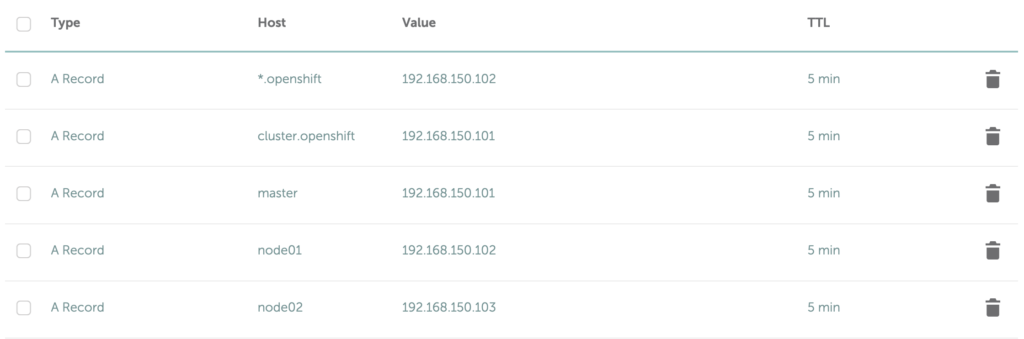
Configure your DNS like the following example, adding some A Records:

  • 192.168.150.101 is the master node, also the public name of the cluster (cluster.openshift) is making reference to this node.
  • 192.168.150.102 is the node01 the infrastructure node, in that node it will by deployed the router pod, that's why the wildcard domain *.openshift is configured to reach that node.
  • 192.168.150.103 is the compute node, node02.

As you can see, we are using the capabilities of DNS A records but we are making reference to local IP's so, all these addresses will not be making sense for external attackers.

Vagrant plugins

vagrant plugin install vagrant-hostmanager

vagrant plugin install vagrant-scp

The only thing that you should perform after having all these prerequisites. would be:

./oc-up.sh

And wait for a while

After that, you can navigate to your new cluster.

https://cluster.openshift.calvarado04.com

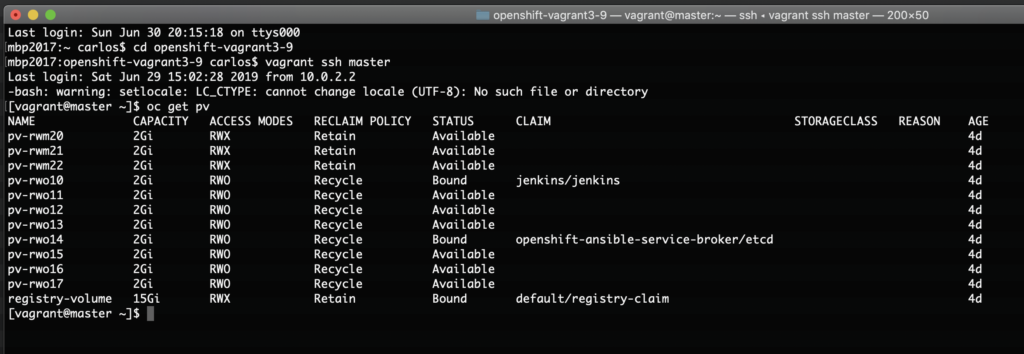
This cluster is including some NFS Persistent Volumes to be able to create a project with persistent storage out of the box.

Obviously, you should to replace my calvarado04.com domain with your own domain.

The default user is admin and the password is handhand.

Why OpenShift 3.9.78?

Just because is the official version for the Red Hat Certified Specialist in OpenShift Administration (EX280) certification.

The scripts

If you will be using your own domain, just replace any calvarado04.com with your domain on the following scripts.

Create a directory like openshift-vagrant3-9 and in there place the following scripts:

Vagrantfile

OPENSHIFT_RELEASE = "3.9"
OPENSHIFT_ANSIBLE_BRANCH = "release-#{OPENSHIFT_RELEASE}"
NETWORK_BASE = "192.168.150"
INTEGRATION_START_SEGMENT = 101

# All Vagrant configuration is done below. The "2" in Vagrant.configure
# configures the configuration version (we support older styles for
# backwards compatibility). Please don't change it unless you know what
# you're doing.

$script = %{
if ! subscription-manager status; then
  sudo subscription-manager register --username=youraccount  --password=yourpassword
  sudo subscription-manager attach --pool=yourpool
  sudo subscription-manager repos --enable=rhel-7-server-extras-rpms
  sudo subscription-manager repos --enable=rhel-7-server-ansible-2.4-rpms 
  sudo subscription-manager repos --enable=rhel-7-server-ose-3.9-rpms
  sudo subscription-manager repos --enable=rhel-7-server-rpms
  sudo subscription-manager repos --enable=rhel-7-fast-datapath-rpms
  sudo rm -rf /etc/yum.repos.d/epel.repo
  sudo rm -rf /etc/yum.repos.d/epel-testing.repo 
  sudo yum install -y docker
  sudo systemctl enable docker
  sudo systemctl start docker
  sudo setsebool -P virt_sandbox_use_fusefs on
  sudo setsebool -P virt_use_fusefs on
fi
}

Vagrant.configure("2") do |config|
  # The most common configuration options are documented and commented below.
  # For a complete reference, please see the online documentation at
  # https://docs.vagrantup.com.

  # Every Vagrant development environment requires a box. You can search for
  # boxes at https://vagrantcloud.com/search.
  config.vm.box = "generic/rhel7"
  config.vm.box_check_update = true
  config.vm.provision "shell", inline: $script

#  if Vagrant.has_plugin?('landrush')
#    config.landrush.enabled = true
#    config.landrush.tld = 'calvarado04.com'
#    config.landrush.guest_redirect_dns = false
#  end

  config.hostmanager.enabled = true
  config.hostmanager.manage_host = true
  config.hostmanager.ignore_private_ip = false


  config.vm.provider "virtualbox" do |vb|
    vb.memory = "3072"
    vb.cpus   = "2"
  end

  # Define nodes
  (1..2).each do |i|
    config.vm.define "node0#{i}" do |node|
      node.vm.network "private_network", ip: "#{NETWORK_BASE}.#{INTEGRATION_START_SEGMENT + i}"
      node.vm.hostname = "node0#{i}.calvarado04.com"

      if "#{i}" == "1"
        node.hostmanager.aliases = %w(lb.calvarado04.com)
      end
    end
  end

  # Define master
  config.vm.define "master", primary: true do |node|
    node.vm.network "private_network", ip: "#{NETWORK_BASE}.#{INTEGRATION_START_SEGMENT}"
    node.vm.hostname = "master.calvarado04.com"
    node.hostmanager.aliases = %w(etcd.calvarado04.com nfs.calvarado04.com)
    
    # 
    # Memory of the master node must be allocated at least 2GB in order to
    # prevent kubernetes crashed-down due to 'out of memory' and you'll end
    # up with 
    # "Unable to restart service origin-master: Job for origin-master.service 
    #  failed because a timeout was exceeded. See "systemctl status 
    #  origin-master.service" and "journalctl -xe" for details."
    #
    # See https://github.com/kubernetes/kubernetes/issues/13382#issuecomment-154891888
    # for mor details.
    #
    node.vm.provider "virtualbox" do |vb|
      vb.memory = "3072"
      vb.cpus   = "2"
    end
    

    # Deploy private keys of each node to master
    if File.exist?(".vagrant/machines/master/virtualbox/private_key")
      node.vm.provision "master-key", type: "file", run: "never", source: ".vagrant/machines/master/virtualbox/private_key", destination: "/home/vagrant/.ssh/master.key"
    end

    if File.exist?(".vagrant/machines/node01/virtualbox/private_key")
      node.vm.provision "node01-key", type: "file", run: "never", source: ".vagrant/machines/node01/virtualbox/private_key", destination: "/home/vagrant/.ssh/node01.key"
    end

    if File.exist?(".vagrant/machines/node02/virtualbox/private_key")
      node.vm.provision "node02-key", type: "file", run: "never", source: ".vagrant/machines/node02/virtualbox/private_key", destination: "/home/vagrant/.ssh/node02.key"
    end
  end
end

oc-up.sh

#!/bin/bash
#
# Copyright 2017 Liu Hongyu
#
# Licensed under the Apache License, Version 2.0 (the "License");
# you may not use this file except in compliance with the License.
# You may obtain a copy of the License at
#
#     http://www.apache.org/licenses/LICENSE-2.0
#
# Unless required by applicable law or agreed to in writing, software
# distributed under the License is distributed on an "AS IS" BASIS,
# WITHOUT WARRANTIES OR CONDITIONS OF ANY KIND, either express or implied.
# See the License for the specific language governing permissions and
# limitations under the License.

# resolve links - $0 may be a softlink
PRG="$0"
RETCODE=0

while [ -h "$PRG" ]; do
    ls=`ls -ld "$PRG"`
    link=`expr "$ls" : '.*-> \(.*\)$'`
    if expr "$link" : '/.*' > /dev/null; then
        PRG="$link"
    else
        PRG=`dirname "$PRG"`/"$link"
    fi
done

# Get standard environment variables
PRGDIR=`dirname "$PRG"`

readonly openshift_release=`cat Vagrantfile | grep '^OPENSHIFT_RELEASE' | awk -F'=' '{print $2}' | sed 's/^[[:blank:]\"]*//;s/[[:blank:]\"]*$//'`

. "$PRGDIR/common.sh"

vagrant up

vagrant provision --provision-with master-key,node01-key,node02-key

vagrant scp ansible-hosts master:/home/vagrant/ansible-hosts

vagrant scp master.sh master:/home/vagrant/master.sh 

vagrant scp all.sh master:/home/vagrant/all.sh

vagrant scp common.sh master:/home/vagrant/common.sh

vagrant scp htpasswd master:/home/vagrant/htpasswd

vagrant scp calvarado04_com master:/home/vagrant/

vagrant scp _openshift_calvarado04_com master:/home/vagrant/


vagrant ssh master -c 'sudo mkdir /exports; sudo chmod 777 /exports'
vagrant ssh master -c 'sudo yum install -y nfs-utils rpcbind'
vagrant ssh master -c 'sudo systemctl enable nfs-server'
vagrant ssh master -c 'sudo systemctl enable rpcbind'
vagrant ssh master -c 'sudo systemctl enable nfs-lock'
vagrant ssh master -c 'sudo systemctl enable nfs-idmap'
vagrant ssh master -c 'sudo setsebool -P nfs_export_all_rw on'
vagrant ssh master -c 'sudo setsebool -P virt_sandbox_use_fusefs on'
vagrant ssh master -c 'sudo setsebool -P virt_use_fusefs on'
vagrant ssh master -c 'sudo firewall-cmd --zone=public --add-service=nfs'
vagrant ssh master -c 'sudo firewall-cmd --zone=public --add-service=nfs  --permanent'
vagrant ssh master -c 'echo "/exports *(rw,root_squash,sync,no_wdelay)" > /home/vagrant/exports; sudo mv /home/vagrant/exports /etc/exports'
vagrant ssh master -c 'sudo systemctl start nfs-server'
vagrant ssh master -c 'sudo systemctl start rpcbind'
vagrant ssh master -c 'sudo systemctl start nfs-lock'
vagrant ssh master -c 'sudo systemctl start nfs-idmap'


vagrant ssh node01 -c 'sudo yum install -y nfs-utils rpcbind'
vagrant ssh node01 -c 'sudo setsebool -P nfs_export_all_rw on'
vagrant ssh node01 -c 'sudo setsebool -P virt_sandbox_use_fusefs on'
vagrant ssh node01 -c 'sudo setsebool -P virt_use_fusefs on'
vagrant ssh node01 -c 'sudo mkdir /exports; sudo chmod 777 /exports'
vagrant ssh node01 -c 'sudo mount -t nfs -o rw,sync master.calvarado04.com:/exports /exports'

vagrant ssh node02 -c 'sudo setsebool -P nfs_export_all_rw on'
vagrant ssh node02 -c 'sudo setsebool -P virt_sandbox_use_fusefs on'
vagrant ssh node02 -c 'sudo setsebool -P virt_use_fusefs on'

vagrant ssh master -c 'sudo /bin/bash /home/vagrant/master.sh'

vagrant scp CreatePVs.sh master:/home/vagrant

vagrant ssh master -c 'ansible-playbook /usr/share/ansible/openshift-ansible/playbooks/prerequisites.yml'

if [ $? -eq 0 ]; then 

  vagrant ssh master -c 'ansible-playbook /usr/share/ansible/openshift-ansible/playbooks/deploy_cluster.yml'

  vagrant ssh master -c 'chmod 755 /home/vagrant/CreatePVs.sh; /bin/bash /home/vagrant/CreatePVs.sh'


else

  echo -e "\n The prerequisites has been failed, please check. \n"

fi

htpasswd

admin:$apr1$gfaL16Jf$c.5LAvg3xNDVQTkk6HpGB1

CreatePVs.sh

oc adm policy add-cluster-role-to-user cluster-admin admin

mkdir -p /exports/openshift/pvs/

chmod 777 /exports/openshift/pvs/


mkdir -p /home/vagrant/pvfiles


export volsize="2Gi"

for volume in pv-rwo{10..17} ; do
  mkdir -p /exports/openshift/pvs/${volume}
  chmod 777 /exports/openshift/pvs/${volume}
  cat << EOF > /home/vagrant/pvfiles/${volume}
{
  "apiVersion": "v1",
  "kind": "PersistentVolume",
  "metadata": {
    "name": "${volume}"
  },
  "spec": {
    "capacity": {
        "storage": "${volsize}"
    },
    "accessModes": [ "ReadWriteOnce" ],
    "nfs": {
        "path": "/exports/openshift/pvs/${volume}",
        "server": "master.calvarado04.com"
    },
    "persistentVolumeReclaimPolicy": "Recycle"
  }
}
EOF
  echo "Created def file for ${volume}";
done;


for volume in pv-rwm{20..22} ; do
  mkdir -p /exports/openshift/pvs/${volume}
  chmod 777 /exports/openshift/pvs/${volume}
  cat << EOF > /home/vagrant/pvfiles/${volume}
{
  "apiVersion": "v1",
  "kind": "PersistentVolume",
  "metadata": {
    "name": "${volume}"
  },
  "spec": {
    "capacity": {
        "storage": "${volsize}"
    },
    "accessModes": [ "ReadWriteMany" ],
    "nfs": {
        "path": "/exports/openshift/pvs/${volume}",
        "server": "master.calvarado04.com"
    },
    "persistentVolumeReclaimPolicy": "Retain"
  }
}
EOF
  echo "Created def file for ${volume}";
done;


cat /home/vagrant/pvfiles/* | oc create -f -

common.sh

#!/bin/bash
#
# Copyright 2017 Liu Hongyu
#
# Licensed under the Apache License, Version 2.0 (the "License");
# you may not use this file except in compliance with the License.
# You may obtain a copy of the License at
#
#     http://www.apache.org/licenses/LICENSE-2.0
#
# Unless required by applicable law or agreed to in writing, software
# distributed under the License is distributed on an "AS IS" BASIS,
# WITHOUT WARRANTIES OR CONDITIONS OF ANY KIND, either express or implied.
# See the License for the specific language governing permissions and
# limitations under the License.
#

#===  FUNCTION  ================================================================
#         NAME:  version
#  DESCRIPTION:  Convert a version string to integer
# PARAMETER  1:  Version string
#===============================================================================
function version() {
    echo "$@" | awk -F "." '{ printf("%01d%03d\n", $1, $2); }'
}

master.sh

#!/bin/bash
#
# Copyright 2017 Liu Hongyu
#
# Licensed under the Apache License, Version 2.0 (the "License");
# you may not use this file except in compliance with the License.
# You may obtain a copy of the License at
#
#     http://www.apache.org/licenses/LICENSE-2.0
#
# Unless required by applicable law or agreed to in writing, software
# distributed under the License is distributed on an "AS IS" BASIS,
# WITHOUT WARRANTIES OR CONDITIONS OF ANY KIND, either express or implied.
# See the License for the specific language governing permissions and
# limitations under the License.
#

yum -y install git net-tools bind-utils iptables-services bridge-utils bash-completion kexec-tools sos psacct
      
# Sourcing common functions
. /home/vagrant/common.sh

yum -y install openshift-ansible

mv /home/vagrant/ansible-hosts /etc/ansible/hosts

mkdir -p /home/vagrant/.ssh
bash -c 'echo "Host *" >> /home/vagrant/.ssh/config'
bash -c 'echo "StrictHostKeyChecking no" >> /home/vagrant/.ssh/config'
chmod 600 /home/vagrant/.ssh/config
chown -R vagrant:vagrant /home/vagrant

ansible-hosts

# Create an OSEv3 group that contains the masters and nodes groups
[OSEv3:children]
masters
nodes
etcd
nfs

# Set variables common for all OSEv3 hosts
[OSEv3:vars]
# SSH user, this user should allow ssh based auth without requiring a password
ansible_ssh_user=vagrant

# If ansible_ssh_user is not root, ansible_become must be set to true
ansible_become=true

openshift_deployment_type=openshift-enterprise
openshift_image_tag=v3.9.78
openshift_pkg_version=-3.9.78
openshift_release=3.9.78
openshift_disable_check=disk_availability,docker_storage,memory_availability


osm_cluster_network_cidr=10.1.0.0/16
openshift_portal_net=172.30.0.0/16
hostSubnetLength=9
os_sdn_network_plugin_name='redhat/openshift-ovs-subnet'

openshift_console_install=true
openshift_console_hostname=console.openshift.calvarado04.com
openshift_enable_unsupported_configurations=true

#Add your own Red Hat credentials
oreg_auth_user=youruser
oreg_auth_password=yourpassword

#OCR configuration variables
openshift_hosted_registry_storage_kind=nfs
openshift_hosted_registry_storage_access_modes=['ReadWriteMany']
openshift_hosted_registry_storage_nfs_directory=/exports
openshift_hosted_registry_storage_nfs_options='*(rw,root_squash)'
openshift_hosted_registry_storage_volume_name=registry
#openshift_hosted_registry_selector='node-role.kubernetes.io/infra=true'
openshift_hosted_registry_storage_volume_size=15Gi
openshift_hosted_registry_storage_host=master.calvarado04.com

openshift_examples_modify_imagestreams=true
os_firewall_use_firewalld=True

#Comment this if you don't have your own SSL certificates

#Master/API certificates
openshift_master_overwrite_named_certificates=true

openshift_master_named_certificates=[{'certfile': '/home/vagrant/_openshift_calvarado04_com/_openshift_calvarado04_com.crt', 'keyfile': '/home/vagrant/_openshift_calvarado04_com/_openshift_calvarado04_com.key', 'names':  ['cluster.openshift.calvarado04.com'], 'cafile': '/home/vagrant/_openshift_calvarado04_com/_openshift_calvarado04_com.ca-bundle' }]

#Router certificates
openshift_hosted_router_certificate={'cafile': '/home/vagrant/_openshift_calvarado04_com/_openshift_calvarado04_com.ca-bundle', 'certfile': '/home/vagrant/_openshift_calvarado04_com/_openshift_calvarado04_com.crt', 'keyfile': '/home/vagrant/_openshift_calvarado04_com/_openshift_calvarado04_com.key'} 


#Htpasswd
openshift_master_identity_providers=[{'name': 'htpasswd_auth', 'login': 'true', 'challenge': 'true', 'kind': 'HTPasswdPasswordIdentityProvider', 'filename': '/home/vagrant/htpasswd'}]


openshift_master_htpasswd_file=/home/vagrant/htpasswd
# Default login account: admin / handhand

openshift_disable_check=disk_availability,memory_availability,docker_storage,docker_image_availability
openshift_docker_options=" --selinux-enabled --log-driver=journald --storage-driver=overlay --registry-mirror=http://4a0fee72.m.daocloud.io "

openshift_node_groups=[{'name': 'node-config-master', 'labels': ['node-role.kubernetes.io/master=true','runtime=docker']}, {'name': 'node-config-infra', 'labels': ['node-role.kubernetes.io/infra=true','runtime=docker']}, {'name': 'node-config-infra-compute','labels': ['node-role.kubernetes.io/infra=true','node-role.kubernetes.io/compute=true','runtime=docker']}, {'name': 'node-config-compute', 'labels': ['node-role.kubernetes.io/compute=true','runtime=docker'], 'edits': [{ 'key': 'kubeletArguments.pods-per-core','value': ['20']}]}]

openshift_enable_service_catalog=true
template_service_broker_install=true

openshift_hosted_router_replicas=1

openshift_master_api_port=443
openshift_master_console_port=443
openshift_master_default_subdomain=openshift.calvarado04.com
openshift_master_cluster_public_hostname=cluster.openshift.calvarado04.com
openshift_master_cluster_hostname=master.calvarado04.com


openshift_template_service_broker_namespaces=['openshift']
ansible_service_broker_install=true
openshift_master_dynamic_provisioning_enabled=true

# host group for masters
[masters]
master.calvarado04.com openshift_ip=192.168.150.101 openshift_host=192.168.150.101 ansible_ssh_private_key_file="/home/vagrant/.ssh/master.key"

[etcd]
master.calvarado04.com openshift_ip=192.168.150.101 openshift_host=192.168.150.101 ansible_ssh_private_key_file="/home/vagrant/.ssh/master.key"

[nodes]
master.calvarado04.com openshift_ip=192.168.150.101 openshift_host=192.168.150.101 ansible_ssh_private_key_file="/home/vagrant/.ssh/master.key" openshift_node_problem_detector_install=true openshift_schedulable=True openshift_node_labels="{'region':'master', 'node-role.kubernetes.io/master':'true'}"
node01.calvarado04.com openshift_ip=192.168.150.102 openshift_host=192.168.150.102 ansible_ssh_private_key_file="/home/vagrant/.ssh/node01.key" openshift_node_problem_detector_install=true openshift_schedulable=True openshift_node_labels="{'region':'infra', 'node-role.kubernetes.io/infra':'true'}"
node02.calvarado04.com openshift_ip=192.168.150.103 openshift_host=192.168.150.103 ansible_ssh_private_key_file="/home/vagrant/.ssh/node02.key" openshift_node_problem_detector_install=true openshift_schedulable=True openshift_node_labels="{'region':'compute', 'node-role.kubernetes.io/compute':'true'}"

[nfs]
master.calvarado04.com

Don't forget to add your SSL certificates.

Gallery